



Sentry
Connect Sentry so investigations can search errors, inspect issues, and read performance data from your Sentry organization.
NeuBird connects through Sentry’s hosted MCP server and authenticates with OAuth. There is no API token or organization ID to copy: you point NeuBird at an MCP endpoint and approve the connection in the browser.
Step 1: Find your MCP Endpoint
Section titled “Step 1: Find your MCP Endpoint”-
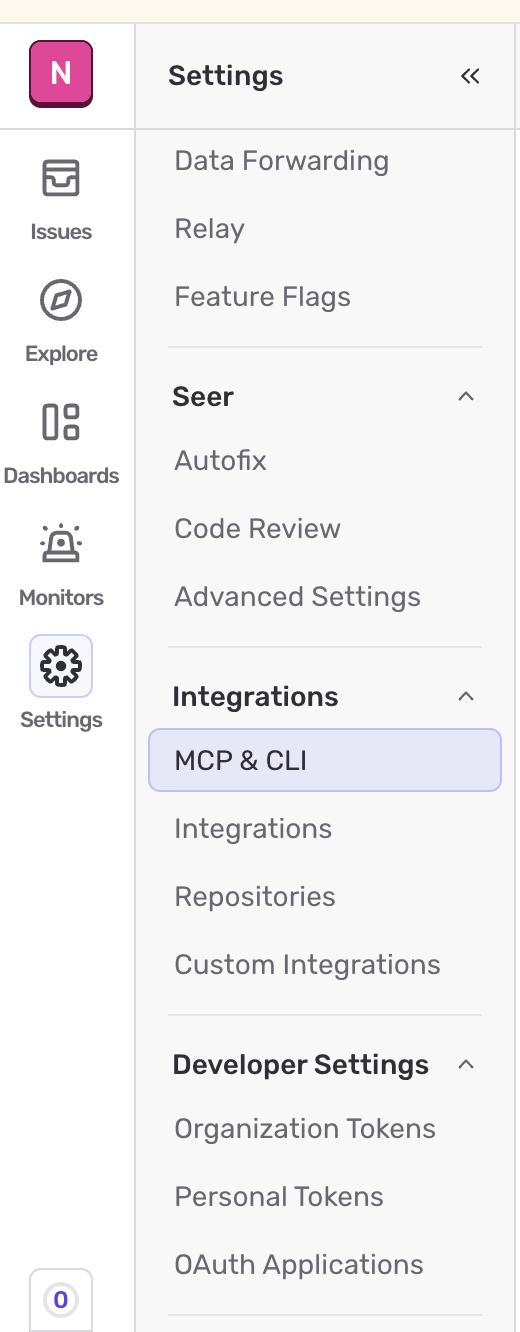
In Sentry, open Settings, then under Integrations select MCP & CLI.
-
The MCP Server card lists the URLs you can use.
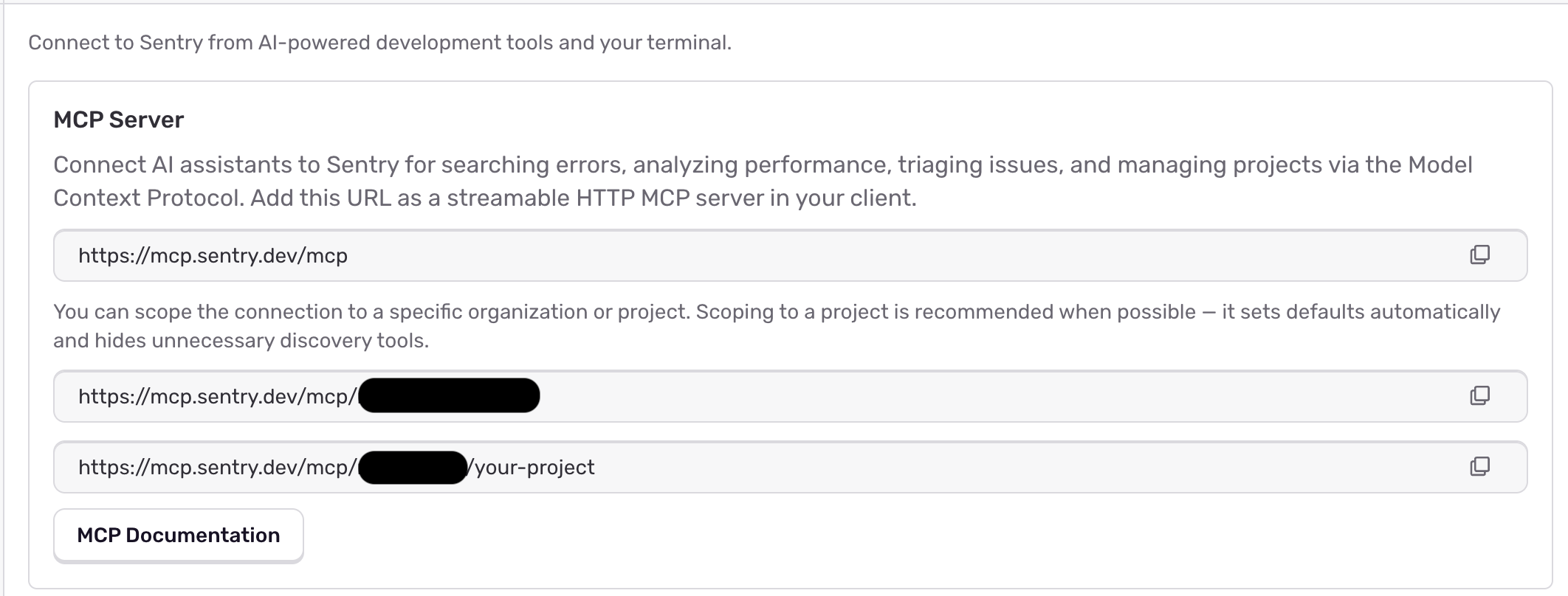
Three forms are available, and the one you choose decides how much of Sentry the connection can reach:
| Endpoint | Scope |
|---|---|
https://mcp.sentry.dev/mcp | Every organization your account can access |
https://mcp.sentry.dev/mcp/{organization} | One organization |
https://mcp.sentry.dev/mcp/{organization}/{project} | One project |
Scope to an organization or project where you can. NeuBird fills the organization and project into tool calls automatically when the endpoint carries them, so scoped endpoints need less context to work with and expose less of Sentry.
Step 2: Add the Connection in NeuBird
Section titled “Step 2: Add the Connection in NeuBird”- In NeuBird, go to Settings > Connections and click Add Connection.
- Select Sentry.
- Enter a Name and, optionally, a Description.
- In Endpoint, paste the MCP URL from Step 1. Leaving it blank uses
https://mcp.sentry.dev/mcp. - Leave Client ID and Client Secret empty unless you have been told otherwise — see the note below.
- Click Save. NeuBird opens Sentry in the browser; sign in and approve the request. Once you approve, Sentry returns you to NeuBird and the connection is created.
Connection Fields
Section titled “Connection Fields”| Field | Required | Description |
|---|---|---|
| Name | Yes | A descriptive name for this connection |
| Description | No | Optional note about what this connection is for |
| Endpoint | Yes | The MCP URL from Step 1. Defaults to https://mcp.sentry.dev/mcp |
| Client ID | No | Only for authorization servers without Dynamic Client Registration |
| Client Secret | No | Paired with Client ID, and only needed in the same case |
What NeuBird Does with the Connection
Section titled “What NeuBird Does with the Connection”Investigations use Sentry’s read tools — searching events and issues, reading issue details, and querying performance data.
Sentry’s MCP server also exposes tools that change your Sentry data, such as creating projects or teams, updating issues, and managing uptime monitors. NeuBird keeps these out of the tool list agents work from by default, so an investigation will not create or modify Sentry records on its own.
Troubleshooting
Section titled “Troubleshooting”| Symptom | Likely cause |
|---|---|
Validation fails with a message about the /mcp segment | The endpoint has no mcp path segment. It must be https://mcp.sentry.dev/mcp, optionally followed by an organization and project |
| Validation fails on the URL itself | The endpoint is not an absolute http or https URL |
| Tools report a missing organization or project | The endpoint is unscoped, so nothing can be inferred — use an organization- or project-scoped URL |
| The browser step never completes | Sign-in was cancelled, or the Sentry account lacks access to the organization in the endpoint |
For general instructions on creating and managing connections, see the Connections Overview.